
Zero Downtime Dot Net Deployment is one of the best ways to release updates without interrupting live users. For ASP.NET Core applications running in production, even short downtime can affect user experience, API requests, and business operations. In this guide, we will explain how to implement zero downtime deployment using NGINX and a blue-green deployment strategy in a simple and practical way.
Implementing Zero Downtime Dot Net Deployment helps teams release ASP.NET Core applications without affecting live users. This approach keeps one version active while the new version is prepared, tested, and switched safely.
Zero Downtime Dot Net Deployment Explained
Zero Downtime Dot Net Deployment means releasing a new version of your .NET application without making the website or API unavailable to users. Instead of stopping the current application and publishing directly on top of it, you keep one version live while preparing the next version in a separate environment. Once the new version is verified, traffic is switched smoothly.
Why Zero Downtime Dot Net Deployment Matters
For businesses running production .NET applications, downtime can lead to failed requests, poor user experience, and operational issues. A proper deployment strategy helps avoid interruptions during releases and makes the update process much safer.
- Better user experience during application updates
- Reduced deployment risk
- Quick rollback if something goes wrong
- Improved release confidence for technical teams
- More stable production deployments
What is Blue-Green Deployment?
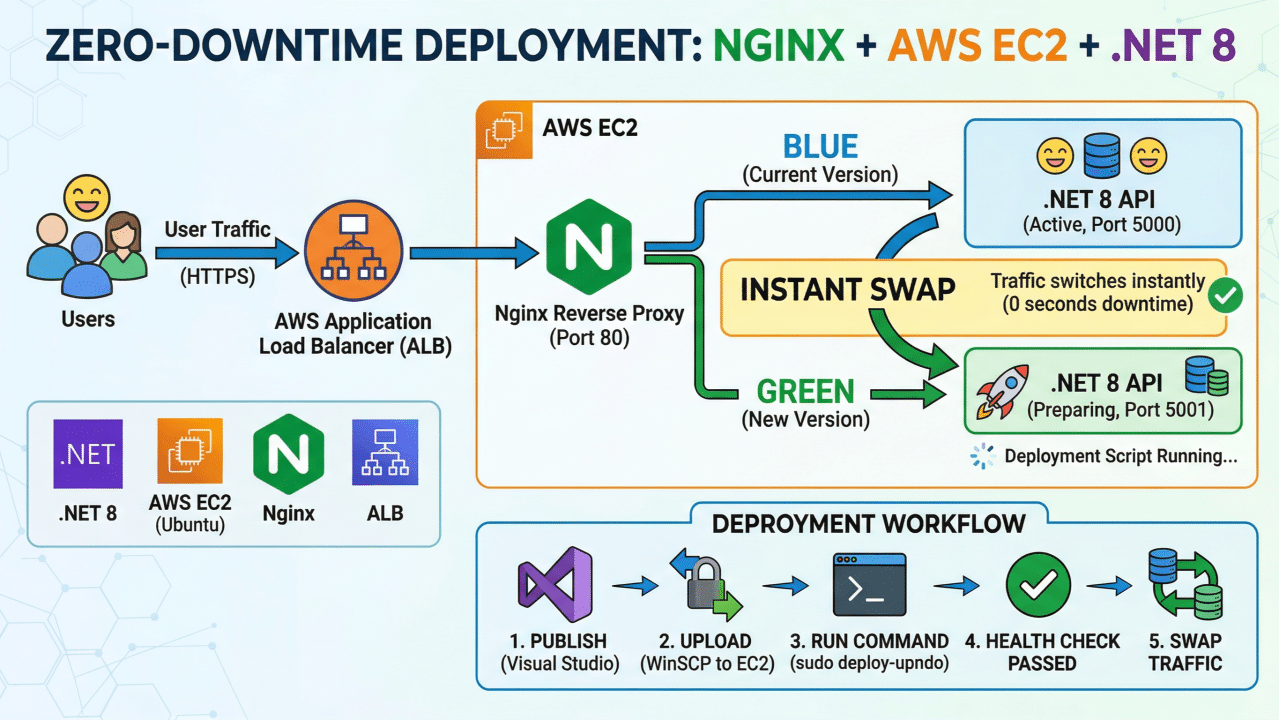
Blue-green deployment is a release strategy where you maintain two environments of the same application. One environment serves live traffic, while the second environment contains the new version ready for testing. When the new version is confirmed, traffic is switched from the current environment to the new one through NGINX.
- Blue = currently live application
- Green = newly deployed version
This setup makes Zero Downtime Dot Net Deployment safer because one stable version is always available.
How NGINX Supports Zero Downtime Dot Net Deployment
NGINX works as a reverse proxy in front of your .NET application. It can route incoming traffic to the currently active environment. When a new release is ready, you update the NGINX upstream target or related configuration to point traffic to the new version.
Example Architecture for Zero Downtime Dot Net Deployment
A simple Zero Downtime Dot Net Deployment setup with NGINX usually includes:
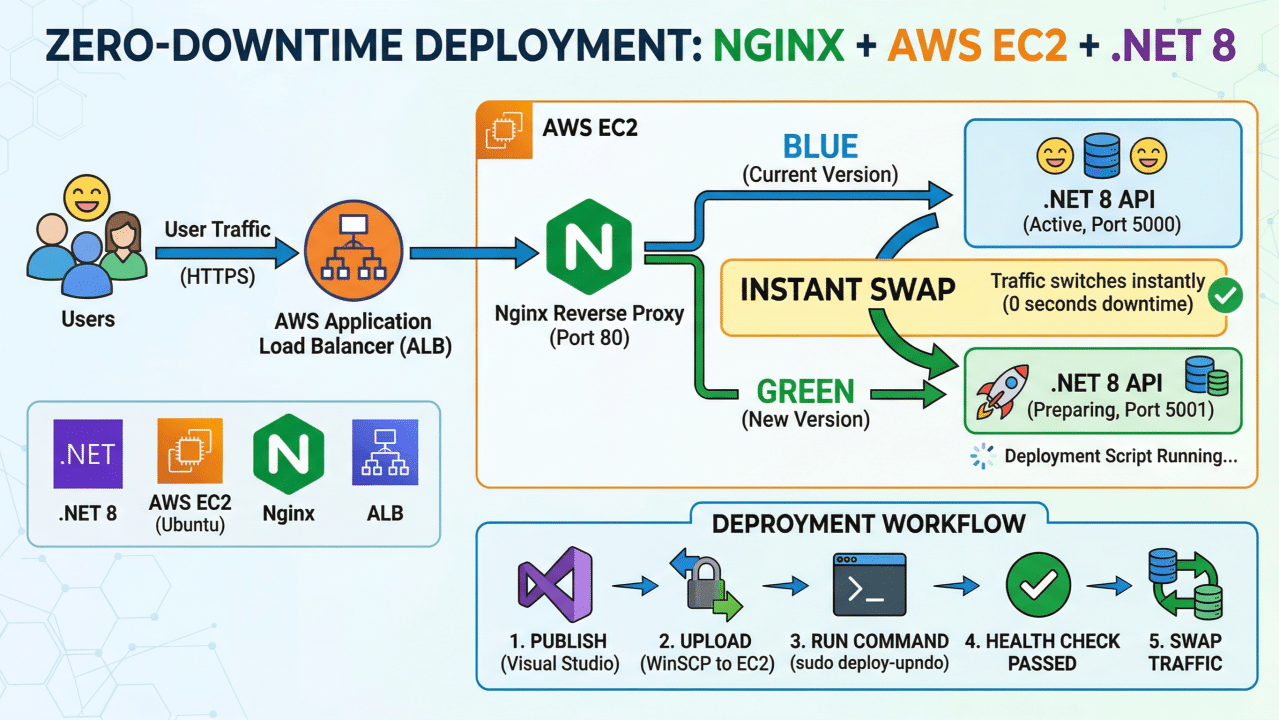
- NGINX as reverse proxy
- Blue environment running on one port
- Green environment running on another port
- ASP.NET Core application published separately for each environment
- Health check before switching traffic
- Rollback support if the new version has issues
This Zero Downtime Dot Net Deployment approach works extremely well for production APIs hosted on AWS EC2.
How Zero Downtime Dot Net Deployment Works
1. Maintain Two Environments
Keep two separate application environments, for example:
- Blue running on port 5000
- Green running on port 5001
2. Deploy to the Inactive Environment
If Blue is currently live, publish the new version to Green. Do not touch the live environment until the new deployment is fully ready.
3. Verify the New Version
Before switching traffic, test the application properly. Check health endpoints, API responses, logs, database connectivity, and background services if used.
4. Switch Traffic Through NGINX
Update the NGINX configuration or upstream target so that traffic starts moving to the new environment. Reload NGINX after the change.
5. Keep the Previous Version Ready
Do not remove the previous environment immediately. Keep it available so you can roll back quickly if a production issue is found after release.
Sample NGINX Configuration for Zero Downtime Dot Net Deployment
upstream dotnet_app {
    server 127.0.0.1:5000;
}

server {
    listen 80;
    server_name yourdomain.com;

    location / {
        proxy_pass http://dotnet_app;
        proxy_http_version 1.1;
        proxy_set_header Host $host;
        proxy_set_header X-Forwarded-For $proxy_add_x_forwarded_for;
        proxy_set_header X-Forwarded-Proto $scheme;
    }
}
Best Practices for Zero Downtime Dot Net Deployment
- Always run health checks before switching traffic
- Use separate publish folders for Blue and Green environments
- Keep environment-specific logs for better debugging
- Do not directly overwrite the live application
- Plan rollback before every release
- Monitor the application immediately after traffic switch
- Make database changes backward compatible wherever possible
Microsoft also explains ASP.NET Core hosting and deployment strategies in their official documentation:
ASP.NET Core Hosting and Deployment Guide.
Common Challenges in Zero Downtime Dot Net Deployment
While this strategy is very effective, teams should also plan for a few practical challenges:
- Database schema changes must be handled carefully
- Background jobs should not duplicate execution
- Shared cache and file storage need proper planning
- Application warm-up may be needed before switching traffic
- Monitoring and rollback should be prepared in advance
Benefits of Using NGINX for Zero Downtime Dot Net Deployment
Combining NGINX with a blue-green strategy gives a practical and reliable setup for growing .NET applications. It supports cleaner releases, better service continuity, and a more professional production workflow.
- Minimal service interruption
- Quick rollback support
- Safer production deployments
- Better release management
- Suitable for business-critical ASP.NET Core applications
Conclusion
Zero Downtime Dot Net Deployment is not only a technical upgrade. It is also a practical step toward stable releases and better business continuity. By using NGINX with blue-green deployment, teams can release updates more safely and avoid unnecessary downtime for users.
If your business depends on ASP.NET Core applications, a proper deployment process can improve reliability, reduce release stress, and support future scaling.
Frequently Asked Questions About Zero Downtime Dot Net Deployment
What is Zero Downtime Dot Net Deployment?
Zero Downtime Dot Net Deployment means publishing a new version of a .NET application without interrupting live users or making the API unavailable.
Why use NGINX for Zero Downtime Dot Net Deployment?
NGINX acts as a reverse proxy and helps switch traffic between two application environments, which makes deployment smoother and safer.
What is blue-green deployment in ASP.NET Core?
Blue-green deployment is a release strategy where one environment stays live while another environment is prepared with the new version. After testing, traffic is switched to the new version.
Is Zero Downtime Dot Net Deployment suitable for production applications?
Yes, it is a strong choice for production systems because it reduces downtime risk, improves reliability, and makes rollback easier.
Need Help with ASP.NET Core Deployment?
At BlackBugs Technologies, we help businesses build, deploy, and scale custom .NET applications using reliable architecture and production-ready deployment strategies.
If you need help with ASP.NET Core deployment, DevOps setup, NGINX configuration, or performance optimization, feel free to connect with us.
If your company needs scalable APIs or deployment support, explore our custom software development services.
To discuss your requirement directly, visit our contact page.